Escene ES / WS series — setup for our PBX
Escene (the Chinese company 广州市亿景通信 of Guangzhou) makes inexpensive desk IP phones in the ES and WS ranges, which were installed by the crate in CIS offices and venues throughout the 2010s. The models are discontinued but alive: they are all configured the same way and they do work with our PBX.
The factory web login for the whole range is root / root, and the default address, when there is no DHCP on the network, is 192.168.0.200.
Common credentials, ports and network requirements are on the overview page “SIP phone setup”.
What you need#
- Extension credentials from the admin panel: Admin panel → Telephony → Staff & groups tab → “Reset password” on the operator (how to get them).
- The phone connected by cable through its LAN port to the same network as your computer. Power comes from PoE on builds with a P in the name (ES270-P, ES280-P, ES330-PEG) and from an adapter on the rest.
- A computer with a browser on the same network.
Step 1. Find the phone's IP address#
On the phone: Menu → System settings (系统设置) → View status (查看状态) → Network status (网络状态) — the display shows the current IP address, MAC address, mask and gateway.
If there is no DHCP server on the network, the phone comes up on its factory address 192.168.0.200. To reach it, your computer temporarily needs an address in the same subnet, say 192.168.0.50.
The address type (DHCP, static or PPPoE) is switched in the same place: System settings → Advanced settings (高级设置) → Network (网络) → LAN port settings. The advanced-settings password is empty from the factory — just confirm.
Step 2. Log in to the web interface#
Type the phone's address into your browser: http://<phone IP> (or http://192.168.0.200 if the address is still the factory one).
| Factory value | |
|---|---|
| Address | http://<phone IP> (factory — http://192.168.0.200) |
| Username | root |
| Password | root |
| Advanced-settings password on the phone itself | empty |
After logging in you land on the Phone status (话机状态) page: firmware version, registration state per account and network parameters. The sections are listed on the left.
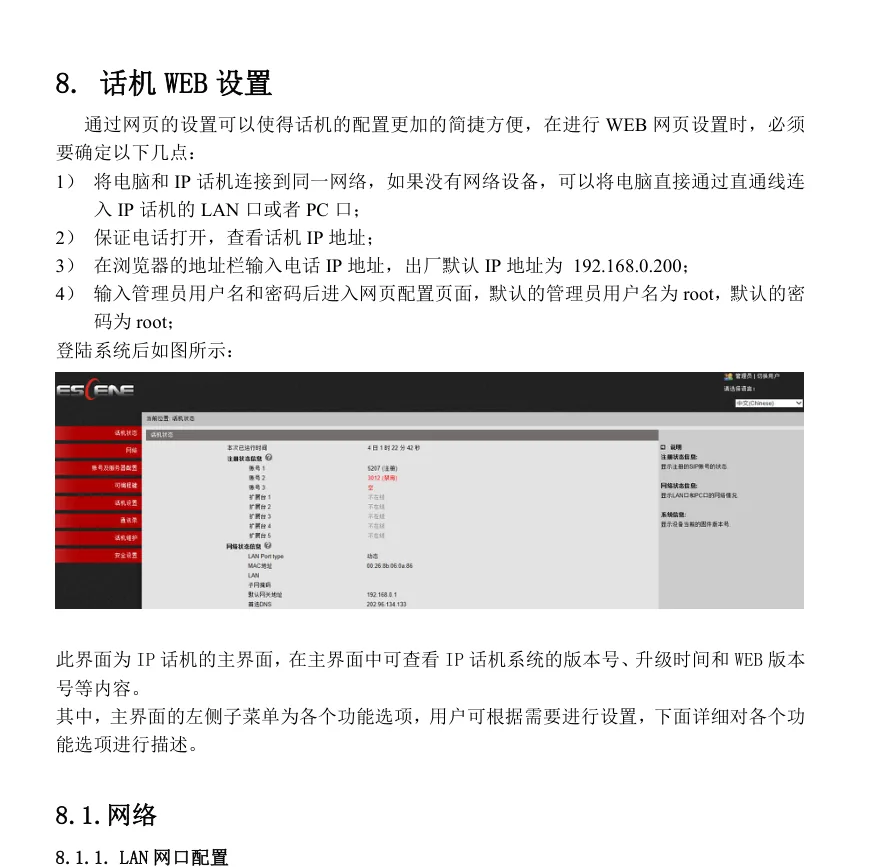 Screenshot: Escene ES330-PEG IP phone, 用户使用手册 (user manual), p. 34.
The administrator password is changed in the phone's maintenance section. If the factory root is refused, the password has been changed; it cannot be recovered, only reset together with the phone.
Step 3. Enter the PBX credentials#
Open the “Account and server settings” (账号及服务器配置) section, pick an account (账号 1) and the “Basic” (基础) block:
| In the admin panel (“Extension credentials”) | On the phone (Account and server → Basic) |
|---|---|
| — | Enable (是否启用) — tick the box |
| — | Account mode (账号模式) — VOIP |
| Extension number | Display name (显示名) — the line caption on the screen |
| Login | Account (帐号) and Authentication username (认证用户名) — the whole sip-…-<extension> string, in both fields |
| Password | Password (密码) |
| SIP server | SIP server (SIP 服务器) |
Port 5060 |
the local SIP port needs no change; our server port is the standard one |
Transport UDP |
Connection type (连接类型) → UDP (the factory value) |
Leave Backup server (备用服务器), Outbound proxy (外出代理服务器), STUN server and NAT Traversal empty and switched off. Save the settings.
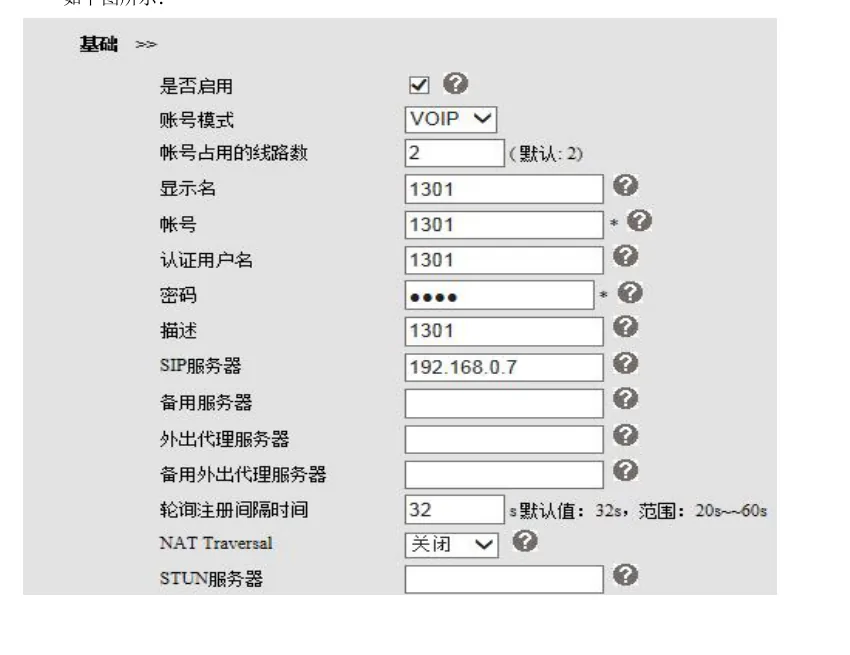 Screenshot: Escene ES330-PEG IP phone, 用户使用手册 (user manual), p. 37.
Optional: setting up from the keypad, registration interval, global SIP settings
- Without a computer. The same account can be typed on the keypad: System settings (系统设置) → Advanced settings (高级设置) → password (empty from the factory) → SIP → SIP account settings (账号SIP 设置) → pick an account and fill in: enable the account, Account (账号), Authentication username (验证用户名), Password (密码), Primary SIP domain (主SIP 域名), Connection type (连接类型) = UDP. Mandatory fields are marked
*. Typing a long login on a numeric keypad is slow — a browser is faster. - Re-registration interval (注册刷新时间) — the factory 3600 seconds, minimum 20; no need to change it.
- Global SIP settings (全局SIP 设置) are used only when no server is set in the account itself. If you filled in the SIP server field in the account, leave the global settings alone.
- The PC port. Its factory mode is “bridge” (网桥模式): you can plug a computer into it and it joins the same network. “Router” mode (路由模式) is not needed here and gets in the way.
Step 4. Verify the registration#
- In the web interface: the Phone status (话机状态) home page shows the registration state of each account — registered or not.
- On the phone: System settings → View status → Line status (线路状态); in idle state a registered account shows its name on the home screen.
- In the admin panel: Telephony → Staff & groups — a green dot lights up next to the operator, together with the string the phone used to identify itself. The status comes from the PBX and refreshes at most once a minute.
- A test call: dial a colleague's extension.
Audio quality — the *43 echo test. The green dot only speaks about registration: the voice travels as a separate stream and breaks separately. Dial *43 on the phone and press Send / OK (most devices do not start dialling on a star key by themselves). The PBX answers, plays a short beep after a second and then plays your own voice back to you — speak into the handset for about ten seconds and listen to yourself. You hear both the beep and yourself: audio flows both ways. Beep but no voice: audio does not reach the PBX from the phone (SIP ALG on the router is the usual culprit). Not even a beep: audio does not reach the phone from the PBX. All outcomes and the measured numbers (loss, jitter, latency) are covered in “Checking call quality”.
Factory reset#
A reset is needed if the phone was bought second-hand (it still holds someone else's account and, worse, someone else's provisioning address, which will overwrite your settings on every reboot), if the root password has been forgotten, or if the phone behaves unpredictably. Everything is erased: SIP accounts, network settings, the web password, the phone book, the language.
Method 1. From the phone. Menu → System settings (系统设置) → Advanced settings (高级设置) → the advanced-settings password (empty from the factory) → Restore factory values (恢复出厂值) → confirm.
Method 2. From the web interface. The phone maintenance section → Restore factory configuration (恢复出厂配置). The manual warns explicitly: after a reset from the web interface the phone has to be rebooted, otherwise the settings do not take effect. The result is the same as resetting from the phone's own screen.
The neighbouring item, Change password (密码修改), is where the web account is changed — the factory username and password are both root.
After the reset. The phone takes an address over DHCP again, or comes up on 192.168.0.200 if there is no DHCP server. The web login is root / root once more, the advanced-settings password is empty again, and the SIP account has to be entered from scratch.
If the phone does not register#
- The extension number was typed into the login field. Account (帐号) and Authentication username (认证用户名) must hold the whole
sip-xxxxxxxx-<extension>string, not “101”. - The “Enable” box (是否启用) is unticked. The account is filled in but switched off, and the phone does not attempt to register.
- The account's SIP server field is empty. The phone then falls back to the global SIP settings — which may hold nothing, or someone else's address. Fill the field in the account itself.
- The password came from the wrong window. An extension password is shown once; if it was not saved, click “Reset password” in the admin panel and enter the new one.
- The phone is on the wrong subnet. Without DHCP it sits on
192.168.0.200and on a192.168.1.xnetwork sees neither the PBX nor your browser. Switch it to DHCP (step 1). - TLS is selected as the connection type. Our PBX does not offer TLS/SRTP encryption: Connection type (连接类型) must be
UDP. - STUN or NAT Traversal is on. We need neither and both get in the way: switch them off.
- SIP ALG on the router. Registration works but the call drops or only one side is audible — switch SIP ALG off (details in the overview).
Still stuck — or the phone is registered but there is no audio, calls drop after 30 seconds, incoming calls do not arrive? Troubleshooting by symptom — “Phone not working”; on-screen messages and error codes — “Not registering: error codes”.
Models in this family#
| Model | Screen / lines | PoE | Setup differences |
|---|---|---|---|
| ES330 / ES330-PEG, WS330 | monochrome graphic, several SIP accounts | on the P build | the reference for this page; the WS330 is the same with Wi-Fi |
| ES220 / ES220N | monochrome, 2 accounts | no | the same web interface and the same fields, root/root |
| ES270 / ES270-P / ES270-PC / ES270-PG | monochrome | on the P builds | same steps |
| ES280-P / ES282-PG / ES282-PC | monochrome | yes | same steps |
| ES290 / ES292 | monochrome, 2 accounts | depends on the build | same steps |
| ES205-P / ES206-P / ES210-P | monochrome, entry level | yes | same steps |
| ES380-PG / ES410 / ES620 / ES680-PEG | higher models, more lines and keys | yes | same steps; the ES620 takes up to eight independent SIP accounts |
| GS series, US102/US103 | — | — | ⚠️ verify: these designations are absent from the vendor's current download section — probably regional names or discontinued models. We have no manual for them and the steps are unverified |
| HS108 / HS118 | hotel phones | depends on the build | a different class of device (for hotel rooms), configured in their own web interface — not covered here |
Frequently asked questions#
escene.cn does not open — is the vendor still around?#
It is. The old escene.cn domain does not respond (checked on 2026-09-09), but the company operates under escene.com.cn, where the manuals and firmware are published by model — including the discontinued ES220, ES290, ES320, ES330, ES410 and ES620: the Downloads section, discontinued-products subsection (退市产品).
The manual is in Chinese — how do I know what to press?#
The field names on this page are given in translation with the Chinese original in brackets: match the characters against your screen. The phone and the web interface can both switch language (English is in the list), so it is easier to switch the interface to English once and use this page for the meaning of the fields.
Can several extensions be registered on one phone?#
Yes. The junior models take two independent SIP accounts and the senior ones (ES620) up to eight, each able to point at its own server. Fill in the second account exactly like the first, with a different login and password.
Does auto-provisioning work with your PBX?#
No, the platform has no provisioning server — the phone is configured by hand as described above. If the phone was bought second-hand and still holds the previous operator's server address, your settings will be overwritten on every reboot: start with a factory reset.
The phone is from 2015–2020 — is it worth connecting at all?#
It is, if it works: all we need is plain SIP over UDP on port 5060 with the G.711/G.722 codecs, and Escene has had that from the start. The one thing to keep in mind is that the model is discontinued, so there will be no new firmware or vendor support — for a new venue's main phone something from a current range is a better bet.
Sources#
- Escene ES330-PEG IP phone, 用户使用手册 (user manual, Chinese) — http://www.escene.com.cn/uploads/soft/20210106/1609902665.pdf (the factory
192.168.0.200address and theroot/rootaccount — p. 34, the web SIP account fields — pp. 37–38, keypad account setup and the empty advanced-settings password — pp. 16–17, the phone menu tree — p. 14, password change and factory-configuration restore — p. 52) - Escene ES220 IP phone, 用户使用手册 (user manual, Chinese) — http://www.escene.com.cn/uploads/soft/20210106/1609902036.pdf (the same factory
root/rootvalues — p. 29) - Escene ES270 IP phone, 用户使用手册 (user manual, Chinese) — http://www.escene.com.cn/uploads/soft/20200525/1590386529.pdf
- Escene downloads section — http://www.escene.com.cn/download.php (manuals and firmware by model, including discontinued ones)
- Open questions: no English-language vendor manual is publicly available — the English field names in the text are marked
⚠️ verify; the GS series and US102/US103 designations are not present in the vendor's current catalogue.