Eltex VP-12/15/17/20/30 and TAU gateways — setup for our PBX
Eltex (Novosibirsk) is a Russian telecom equipment maker, and its VP series IP phones are usually chosen where the buyer is obliged to source hardware from the Russian product register: chains with public contracts, venues attached to institutions, franchises with import-substitution requirements. The same line includes the TAU analogue gateways — you plug the venue's existing analogue phones into them.
All VP models share one web interface with the tabs “Сеть” (Network) · “IP-телефония” (IP telephony) · “Пользовательский интерфейс” (User interface) · “Система” (System) · “Мониторинг” (Monitoring). The interface is in Russian, with a language selector in the top right corner. The TAU gateways look similar, but their telephony settings live elsewhere — see the separate notes below.
General credentials, ports and network rules are on the overview page “SIP phone setup”.
What you will need#
- Extension credentials from the admin panel: SIP server, extension number, login, password, port
5060, transportUDP. Where to get them — “Credentials” (Telephony → Staff & groups → “Reset password”). - The phone on the same network as your computer: a cable into the port marked WAN (not LAN/PC — that one is for a computer).
- A computer with a browser on that same network.
- For a TAU gateway — an ordinary analogue phone plugged into the
Phone 1port. - A power supply: PoE exists only on models with a
Pin the name (VP-12P, VP-15P, VP-17P, VP-20P, VP-30P). The VP-12, VP-15 and VP-20 run off the adapter only.
Step 1. Find out the phone's IP address#
Out of the box the phone takes its address over DHCP. You can read it on the device itself:
- Press the Меню (Menu) soft key.
- Choose 1. Статус (Status) → 1. Сеть (Network).
- The IP-адрес (IP address) line is what you need. (On the VP-20 and VP-30P the items are the same but unnumbered.)
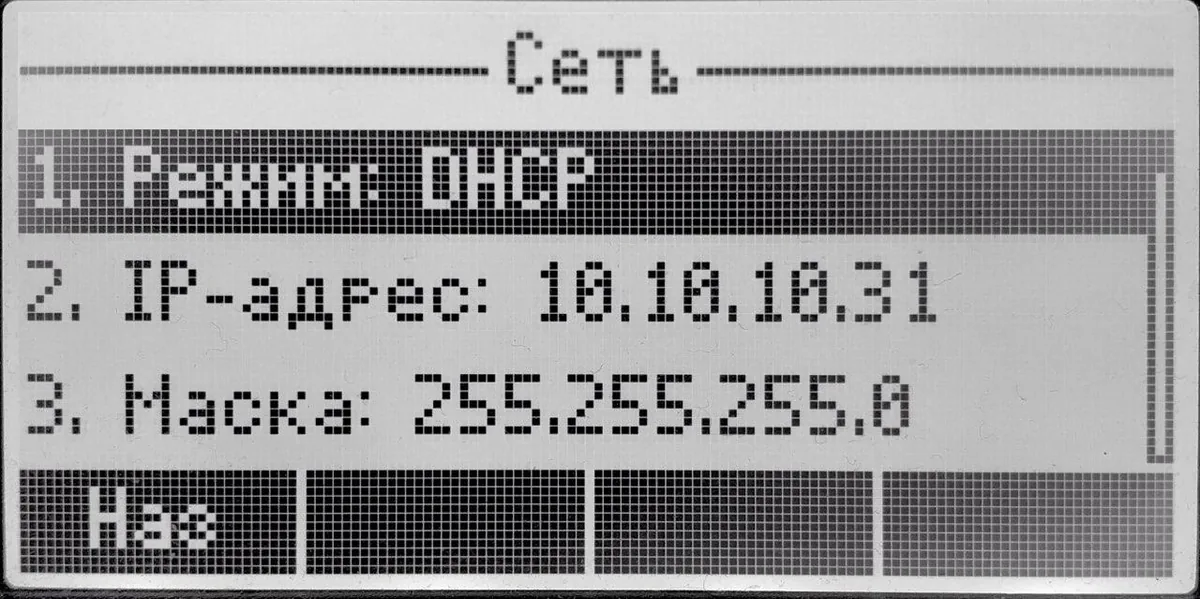 Screenshot: Eltex VP-12(P), VP-15(P) user manual, firmware 2.9.6, p. 112.
If the IP address line is empty, the phone got no address from the router: check that the cable is in the WAN port and that DHCP is running on the network.
A TAU gateway has no screen. Out of the box its WAN port also uses DHCP, while the LAN port has the fixed address 192.168.1.1. The easiest route is to connect the gateway's LAN port to your computer with a cable and open http://192.168.1.1 — everything after that is the same.
Step 2. Log in to the web interface#
Open the address from step 1 in your browser.
| Factory value | |
|---|---|
| Address | http://<phone IP> (a TAU gateway via its LAN port — http://192.168.1.1) |
| Login | admin |
| Password | password |
This is the same across the whole VP series and the TAU gateways. TAU has two more accounts with reduced rights — user/user and viewer; configure the device as admin.
If the password has been changed and nobody knows it, there is no way to recover it — only a factory reset helps. Eltex itself recommends changing the factory password right after setup, in “Система → Пароли” (System → Passwords).
Step 3. Enter the PBX credentials#
Open the IP-телефония (IP telephony) tab → the SIP-аккаунты (SIP accounts) sub-tab, pick “Аккаунт 1” (Account 1) in the drop-down and fill in the fields on the “Основные настройки” (Basic settings) tab:
| In the admin panel (“Extension credentials”) | In the phone (IP telephony → SIP accounts → Account 1) |
|---|---|
| SIP server | SIP-прокси сервер (SIP proxy server) and Сервер регистрации (registrar) — the same address in both |
| Login | Номер телефона (phone number) and Логин (login, in the authentication block) — the whole sip-…-<extension> string in both fields |
| Password | Пароль (password, authentication block) |
Port 5060 |
there is no separate field: the server port is appended to the address after a colon, and the default is 5060 anyway. Leave the SIP-порт field alone — that is the phone's local port |
Transport UDP |
Транспорт (transport) — pick the option that lists UDP first |
| Extension number | Имя пользователя (user name) — the display name of the line; it is handy to repeat it in Имя аккаунта (account name) |
Be sure to tick “Включить” (Enable) at the top and “Регистрация” (Registration) in the SIP parameters block — without them the phone will not register. Leave “Режим использования SIP-прокси” (SIP proxy mode) at Homing (or Parking — with a single server there is no difference).
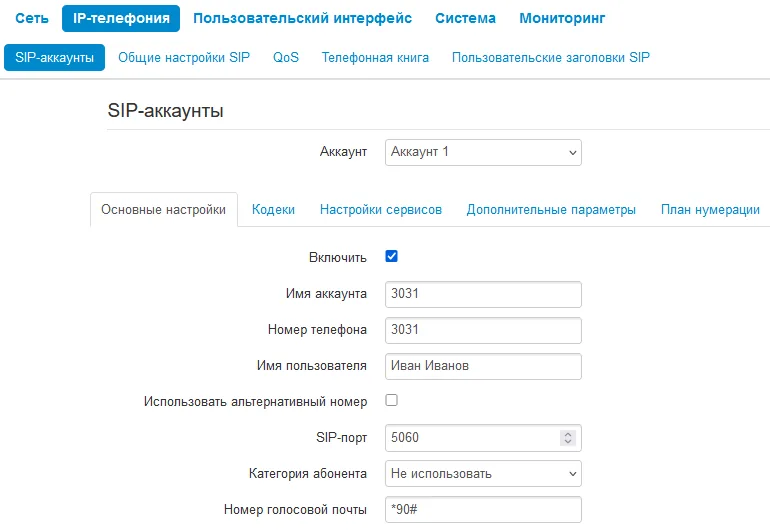 Screenshot: Eltex VP-12(P), VP-15(P) user manual, firmware 2.9.6, p. 43.
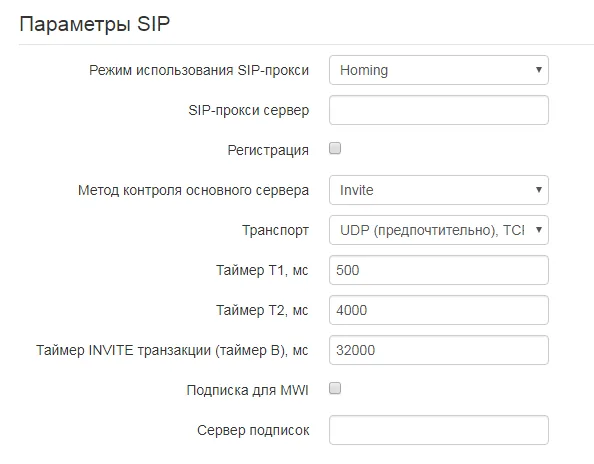 Screenshot: Eltex VP-12(P), VP-15(P) user manual, firmware 2.9.6, p. 44.
Press “Применить” (Apply) at the bottom of the page — the settings are written to non-volatile memory and take effect without a reboot.
How it looks on a TAU gateway
TAU gateways are configured differently: instead of accounts they have lines — one per FXS port with an analogue phone in it.
- Open the IP-телефония (IP telephony) section, the “Линия 1” (Line 1) tab — the
Phone 1port. - Tick “Включить” (Enable).
- Номер (Number) — the whole
sip-…-<extension>login. - Имя пользователя (User name) — the same login: on a gateway this field is the SIP authentication name.
- Пароль (Password) — the password from the admin panel.
- Switch to the “SIP” tab and put our PBX address into “SIP-прокси сервер” (SIP proxy server); port
5060is the default and need not be appended. - Press “Применить” (Apply).
A second analogue phone is set up the same way on the “Линия 2” (Line 2) tab, and it needs its own extension: one account cannot be shared between two ports. The full parameter set (backup proxies, codecs, dial plan) lives in the advanced mode — IP telephony → “Профили SIP” (SIP profiles).
Optional: codecs, DTMF, time
- Codecs — IP telephony → SIP accounts → Account 1 → “Кодеки” (Codecs). Set Codec 1 = G.711a, Codec 2 = G.711u and switch the rest off. The VP-12 and VP-15 have no G.722 in the list at all; on the HD Voice models (VP-17P, VP-20(P), VP-30P) you can put it first.
- DTMF — IP telephony → SIP accounts → Account 1 → “Дополнительные параметры” (Advanced) → “Передача DTMF” (DTMF transmission): the value RFC2833.
- Encryption — do not pick the
TLStransport and do not enable SRTP: the platform does not offer them. - Time — System → “Время” (Time): set the venue's time zone, otherwise the call log on the phone will be shifted.
- Web password — System → “Пароли” (Passwords).
Step 4. Check the registration#
- On the phone: Меню → Статус → Телефония (Menu → Status → Telephony) shows the state of the accounts. On the idle screen the line name appears next to the line.
- In the web interface: the “Мониторинг” (Monitoring) tab → SIP account monitoring.
- In the admin panel: Telephony → the Staff & groups tab — a green dot lights up next to the operator, together with the string the phone used to introduce itself. The status refreshes no more than once a minute.
- A test call: dial a colleague's extension from the phone.
Audio quality — the *43 echo test. The green dot only speaks about registration: the voice travels as a separate stream and breaks separately. Dial *43 on the phone and press Send / OK (most devices do not start dialling on a star key by themselves). The PBX answers, plays a short beep after a second and then plays your own voice back to you — speak into the handset for about ten seconds and listen to yourself. You hear both the beep and yourself: audio flows both ways. Beep but no voice: audio does not reach the PBX from the phone (SIP ALG on the router is the usual culprit). Not even a beep: audio does not reach the phone from the PBX. All outcomes and the measured numbers (loss, jitter, latency) are covered in “Checking call quality”.
Factory reset#
A reset is needed if the phone came second-hand (it holds someone else's account and, worse, someone else's auto-configuration address that restores its own settings on every reboot), if the web password has been forgotten, or if the device behaves unpredictably. Eltex recommends resetting the phone to factory settings on first power-up, before configuring it.
From the phone: Меню → 3. Настройки → 2. Система → 5. Сброс настроек → Да (Menu → Settings → System → Reset settings → Yes). The phone reboots on its own. On the VP-30P this path also asks for the administrator password.
From the web interface: Система → Управление конфигурацией (System → Configuration management) → the “Сброс” (Reset) button next to “Сброс на заводские настройки”.
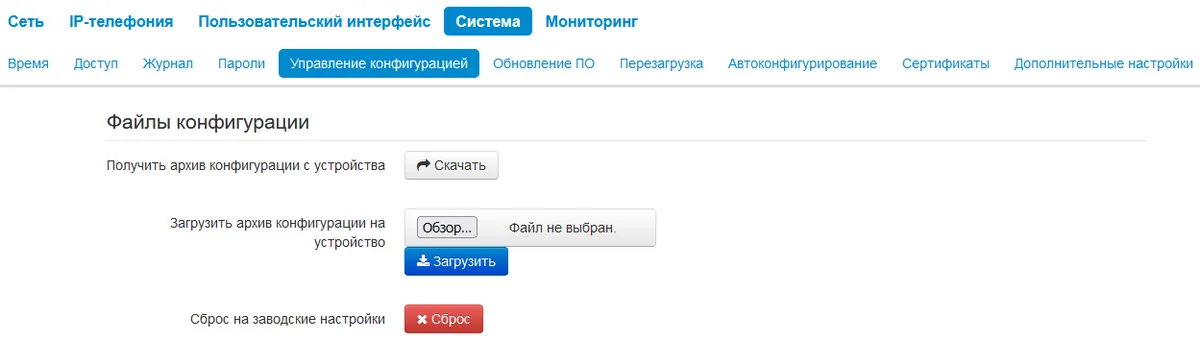 Screenshot: Eltex VP-12(P), VP-15(P) user manual, firmware 2.9.6, p. 86.
On a TAU gateway there is neither screen nor menu: press and hold the “F” button on the side panel until the Power indicator starts blinking red and green alternately. The gateway reboots by itself; after that the WAN port is on DHCP again, the LAN port is 192.168.1.1 and the login is admin/password.
Along with the settings the reset wipes the contacts, the call history and the text messages; the firmware stays. Afterwards the login is admin/password again, the address comes over DHCP, and the setup starts from step 1.
If the phone does not register#
- The checkboxes are not ticked. “Enable” on the account and “Registration” in the SIP parameters block — the most common reason for “everything is filled in and nothing happens”.
- The login is incomplete. You need
sip-…-<extension>, not the extension number alone, and in both fields — the phone number and the authentication login. - The registrar field is empty. The PBX address must be in both the SIP proxy server and the registrar field — for us they are the same.
- The password is stale. Somebody pressed “Reset password” in the admin panel — issue a new one and type it again.
- Transport. It must be an option with UDP; choosing TLS produces silence with no error message.
- The phone got no IP. The IP address line under Menu → Status → Network is empty — check the cable in the WAN port and DHCP on the network.
- Someone else's auto-configuration. Settings “change by themselves” after a reboot — clear System → “Автоконфигурирование” (Auto-configuration) and do a factory reset.
- The venue network. SIP ALG on the router, a guest Wi-Fi with client isolation, UDP 5060 blocked — see the overview.
Still stuck — or the phone is registered but there is no audio, calls drop after 30 seconds, incoming calls do not arrive? Troubleshooting by symptom — “Phone not working”; on-screen messages and error codes — “Not registering: error codes”.
Models in the family#
| Model | Screen / lines | PoE | Setup specifics |
|---|---|---|---|
| VP-12 / VP-12P | mono, 2 accounts | on VP-12P | discontinued but still supported; no G.722 codec |
| VP-15 / VP-15P | mono, 2 accounts | on VP-15P | discontinued but still supported; shares its manual with the VP-12 |
| VP-17P | mono, 4 accounts, HD Voice | yes | menu items are numbered (Menu → 1. Status → 1. Network) |
| VP-20 / VP-20P | colour LCD, 2 accounts, HD Voice | on VP-20P (802.3at) | discontinued; unnumbered menu items; VP-EXT22 expansion module |
| VP-30P | colour LCD, 8 accounts, HD Voice | yes | the on-device reset asks for the administrator password; VP-EXT22 module |
| VP-30P-WB | colour LCD, up to 6 accounts | yes | adds Wi-Fi and a Bluetooth headset |
| TAU-1M.IP | gateway, 1 FXS port | no | configured over LAN 192.168.1.1; shares its manual with TAU-2M/4M |
| TAU-2M.IP | gateway, 2 FXS ports | no | one extension per port |
| TAU-4M.IP / TAU-4.IP | gateway, 4 FXS ports | no | same |
| TAU-8N.IP / TAU-16.IP / TAU-24.IP | gateway, 8 / 16 / 24 FXS ports | no | for a venue with a large fleet of analogue sets |
| TAU-32M.IP | gateway, up to 32 FXS and up to 32 FXO ports | no | rack-mount, usually at the carrier rather than in the venue |
The VP-EXT22 expansion module (22 keys) attaches to the VP-20P, VP-30P and VP-30P-WB and needs no account of its own — it works with the phone's accounts.
Frequently asked questions#
The password password does not work — what now?#
It has already been changed (or the phone was configured by its previous owner). The factory password cannot be recovered and guessing is pointless — do a factory reset from the phone keypad; afterwards the login is admin/password again.
Is an Eltex phone mandatory for a venue with a public contract?#
The “hardware from the Russian product register” requirement applies to the equipment purchase, not to our platform: the PBX works with any SIP phone. The VP series is in that register (the product cards on the Eltex site carry the register number), which is why it gets bought when a purchase follows those rules.
How many extensions fit into one phone?#
As many as the model has accounts: two on the VP-12/VP-15/VP-20, four on the VP-17P, eight on the VP-30P. Each account is configured separately (the account drop-down at the top of the page) and needs its own login and password from the admin panel.
Two analogue phones are plugged into a TAU gateway — do they need one extension or two?#
Two. On a TAU every line (FXS port) is a separate account: Line 1 and Line 2 are configured independently, each with its own login and password. One account cannot be shared between two ports.
Can a fleet of phones be configured automatically?#
Not from our platform's side — it runs no provisioning server. The phones themselves do have the mechanism: System → “Автоконфигурирование” (Auto-configuration), with DHCP options and a profile over TFTP/HTTP. If you run your own provisioning server, the parameters are described in the auto-configuration section of the Eltex manual.
Sources#
- Eltex VP-12(P), VP-15(P) user manual, firmware 2.9.6 — https://eltex.ru/storage/upload_center/files/14/VP-12(P)_VP-15(P)_user_manual_2.9.6.pdf
- Eltex VP-17P user manual, firmware 1.5.11 — https://eltex.ru/storage/upload_center/files/53/VP-17P_user_manual_1.5.11.pdf
- Eltex VP-20(P) user manual, firmware 1.4.1 — https://eltex.ru/storage/upload_center/files/37/VP-20(P)_user_manual_1.4.1.pdf
- Eltex VP-30P user manual, firmware 1.4.6 — https://eltex.ru/storage/upload_center/files/62/VP-30P_user_manual_1.4.6.pdf
- Eltex TAU-2M.IP subscriber gateway user manual, firmware 2.4.2 — https://eltex.ru/storage/upload_center/files/29/TAU-2M_IP_User_manual_2.4.2.pdf
- Line-up and specifications — the vendor catalogue: https://eltex.ru/catalog/voip/