Add-on · impressions are never metered
Forms and offers at the right point in a visit
Collect enquiries from your landing pages. Show a form after reading, on a click or under your campaign rules. Contacts and enquiry sources arrive in your Cenaly.ru dashboard.
Add-on, price in the catalogue
A paid extension for external websites. AI, mailings and connected services have separate terms.
- Rules for the page, traffic source and visitor action
- Enquiries with page URL and UTM tags
- Frequency limits and A/B comparisons

What the guest sees — and what appears on your side
Guest screen

In your dashboard
Where the data goes The Leads inbox in your dashboard, with page URL and UTM; subscriptions go to your mailing list and impression stats to the campaign card
- formats: modal, slide-in, bar and fullscreen
- 4
- display triggers — from an exit attempt to your own site event
- 9
- campaign types: from a plain message to a quiz and a prize wheel
- 11
- A data-based verdict; you apply the winner
- A/B
How it works for the visitor
- 1
The visitor is simply reading the page
They browse pages, scroll the text, add something to the cart. The campaign waits for its condition: time on site, scroll depth, the third page of the visit, an exit attempt, a cart change, a click on your button.
- 2
They see a window or a bar
You choose the format: a modal, a slide-in from a corner, a bar at the top, or a block built right into your markup — inside an article, under a product, in the footer.
- 3
They take one action
They leave an email, take a quiz, spin the wheel, claim a coupon or follow a button. In a quiz the questions branch, so they only answer the relevant ones.
- 4
The code stays with them, the enquiry with you
The coupon they won stays as a sticky reminder with its code and deadline, while the contact and the answers land in the Leads inbox together with the page URL and UTM tags.
Set up in three steps
Create an account and add your site
Signup opens setup for the selected product. Have your domain and permission to insert code ready.
Configure and install
Follow your platform instructions. Blocking trackers before consent requires the early CMP script, not just the shared async tag.
Test your published site
Enable the widget and try the visitor action on the published page. Settings may appear after the cache refreshes.
The tag
<script src="https://cdn.cenaly.ru/site/v1.js" data-domain="your-site.com" async></script>Shared widget tag. See the separate CMP instructions for blocking trackers before consent.
What the popup widget does
Put the offer exactly where it belongs
A modal, a slide-in in one of four corners, a bar at the top or bottom, fullscreen — plus a block in the flow of the page: a subscription in the footer, a quiz inside an article, a coupon under a product card. Best where an overlay is too much but the offer still matters.
Choose the moment from what the visitor does
Nine triggers: page load, time on site, idle, scroll depth, pages per session, an exit attempt, a cart change, a click on an element and your own site event. Best for shops and blogs where the context of the visit matters. Exit intent is desktop-only; your site must connect custom events and cart data.
Pick who the offer is for
Page masks, device, country, UTM tags, the class of the referring source (maps, search, social, direct), new or returning, cart contents and total, interactions with other campaigns and up to 5 conditions on your own site events. Best for anyone paying for ads who would rather not show a discount to everybody. Country is estimated from the browser’s time zone.
Collect contacts and answers
A form with the fields you choose, a quiz with branching, scores, outcomes and a calculator field. Answers and contacts land in the Leads inbox with the page URL and UTM, and export to CSV. Best for services where an enquiry starts with picking the right option.
Hand out coupons as a game — an honest one
A prize wheel (2–8 segments), a scratch card (2–6 options) and gift boxes (3–6): the prize is the code of a real coupon of your location, and the outcome is drawn BEFORE the animation. A campaign with no prizes isn’t shown at all. Best for promotions and collecting subscriptions.
Compare variants without wearing people out
A/B variants with an honest verdict (200 impressions per variant, 10 metric events for the leader, 95 % confidence), and you apply the winner with a button. Alongside them: a pause after a dismissal, a lifetime cap of up to 100 impressions per visitor and a teaser bubble instead of a repeat window. Best for anyone running popups regularly.
Describe the campaign in words — AI drafts it
AI prepares a draft from a text description. Voice input is not available here. You review and publish it yourself; check AI terms in the dashboard.
Where it pays off
A subscription after reading an article
Offer it by scroll depth, or put the form into the footer as a block: the contact goes to Leads and the subscription to your mailing list.
An exit attempt on a product page
On desktop, use an exit-intent signal on selected product pages. This browser signal does not reveal the visitor’s exact intent; choose another trigger on mobile.
A “free delivery” progress bar
The remainder is recalculated with the cart, and the threshold comes from data — delivery settings, a call from your site, or a sum you set.
A quiz before the enquiry
A few branching questions and, at the end, an outcome by score with a coupon or a button. The answers sit next to the contact and the page URL.
“Goes well with” after adding to the cart
A compact slide-in with related items after a cart change. The campaign needs our ordering widget on the same page.
A visitor looking for an appointment slot
A tile with real free slots for a service; a tap on one opens the appointment widget with that time already selected.
What it looks like in the product
Campaign editor
View full size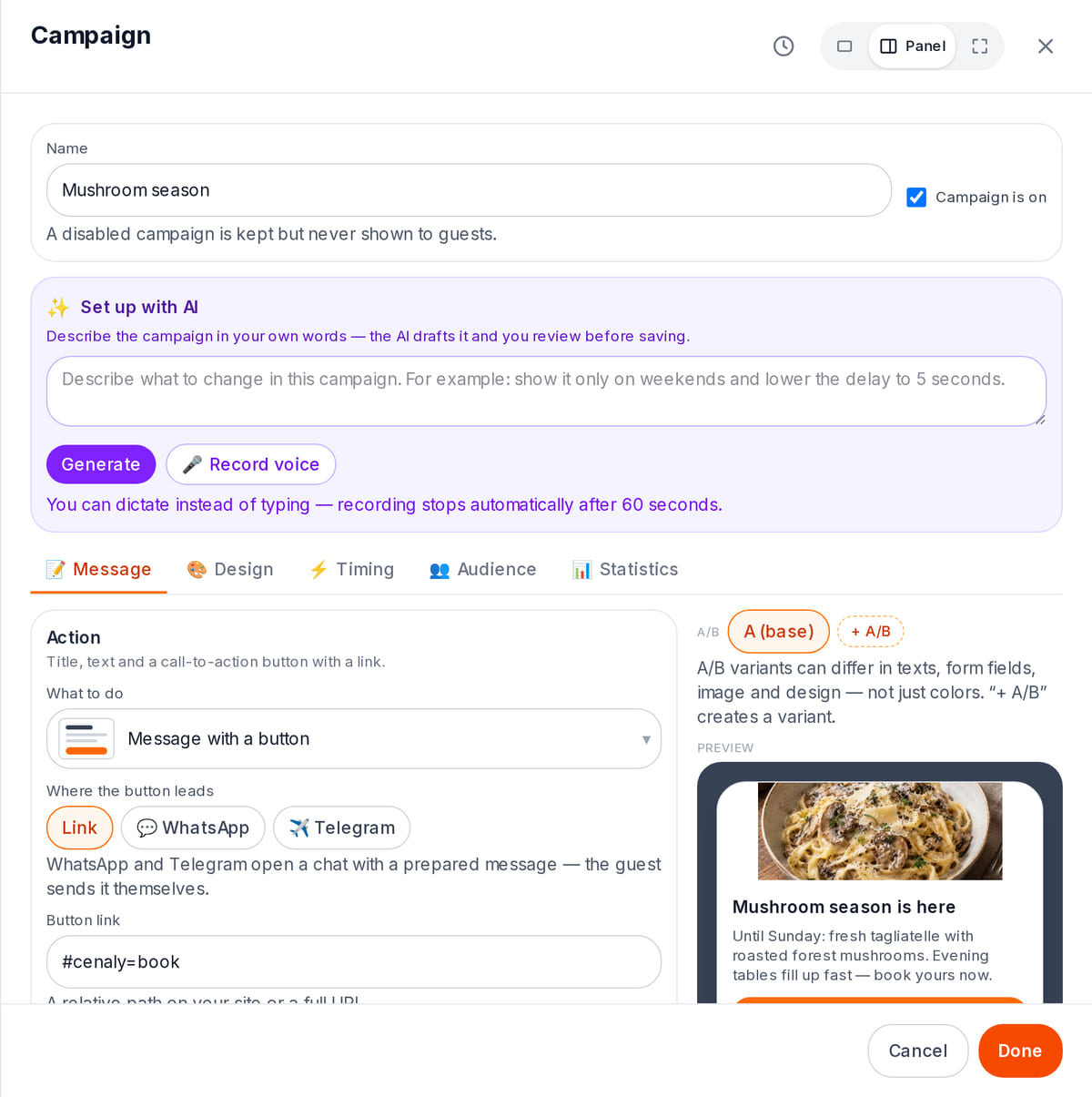
Text, button and preview in one window

How it works in practice
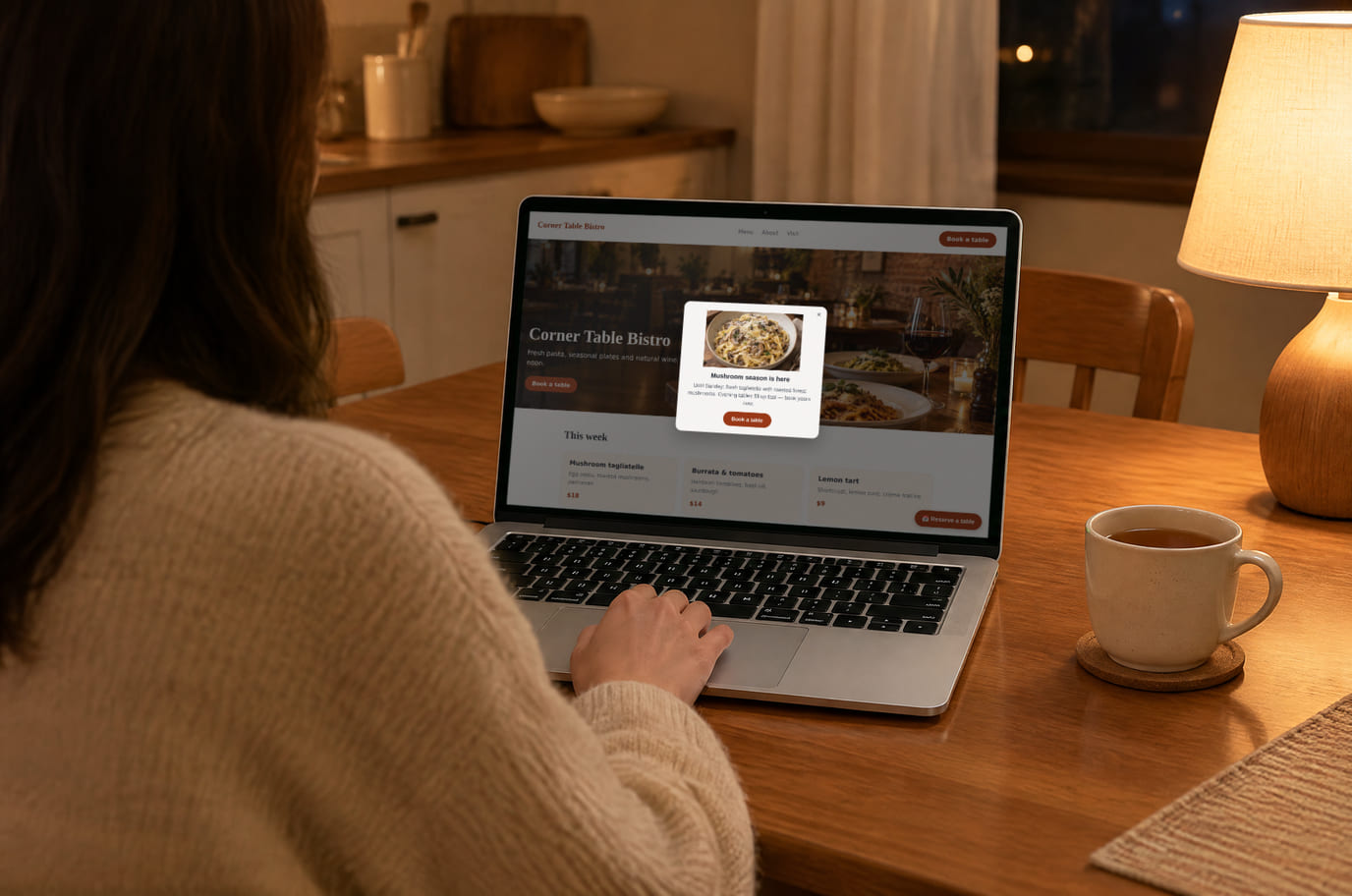
Illustration. The offer shows up while the guest is choosing where to go

How it looks on your site
Example interface. Customise colours, position and labels, then check your page on desktop and mobile.
On desktop
On mobile
On your side: A campaign is built in the admin panel once and runs both on your storefront and on your own website. It never shows on top of another dialog — the display is postponed instead.
On desktop
On mobile
On your side: The lead lands in Leads with its capture context: page URL and UTM. Its group in the inbox is the campaign itself, so you see which one actually worked.
On desktop
On mobile
On your side: The code and its deadline share one key with the storefront: a code handed out on your site is visible in the menu too — and the guest does not collect a second coupon.
Where it goes
Exact menu names and plan requirements, taken from each platform’s own help center.
Sites built with our website builder ship with the widgets already wired — nothing to paste.
Step-by-step guides per platform — in the help center →Pricing
Add-on, price in the catalogue
- A paid extension for external websites; see the price above
- No separate per-impression or per-lead charge
- AI, mailings and connected services have their own terms
- An external website requires the web-popups extension. Campaigns on the Cenaly.ru storefront work without that extension; upcoming appointment slots display only on an external site with appointments configured.
- Cart and custom-event scenarios require integration by your site
With and without
| Without the widget | With the widget | |
|---|---|---|
| Who sees it | ✕ A discount banner hangs on every page for every visitor | ✓ Targeting by page, country, UTM, device, cart and your own site events |
| When it fires | ✕ The window pops a second after load, before the first screen | ✓ Nine triggers: exit, scroll, idle, the Nth page, a cart change |
| Where leads go | ✕ Form enquiries stay in your inbox, with no page URL and no UTM | ✓ Leads land in your dashboard inbox with the page URL and UTM, export to CSV |
| Testing ideas | ✕ Which version worked better is judged by eye | ✓ An A/B verdict with thresholds: 200 impressions per variant, 10 events for the leader, 95 % confidence |
| Fatigue | ✕ The visitor sees the same window on every visit | ✓ A pause after a dismissal, an impression cap and a teaser instead of a repeat window |
Honest about the limits
- An external website requires the web-popups extension. Campaigns on the Cenaly.ru storefront work without that extension; upcoming appointment slots display only on an external site with appointments configured.
- The widget knows about the cart only what your site tells it (a `CenalyEngage.cart` call or a GTM event) or what our own ordering widget reports; that data lives only in the tab’s memory.
- The “goes well with” campaign needs our ordering widget on the same page, and “open chat” needs the chat widget. No neighbour — the campaign isn’t shown and the frequency cap isn’t spent.
- The “towards the goal” bar isn’t shown without a threshold: it comes from the storefront’s delivery settings, arrives from your site, or is set as a sum in the campaign.
- The “nearest free slots” tile is only calculated for service appointments. The engine does not count free tables — there is no floor plan in the public data.
- A block in the flow of the page is not a popup: it doesn’t spend the “one popup per session” limit, doesn’t close on Esc and has no teaser, while a bar or fullscreen in this mode is downgraded to a card.
- Frequency rules reduce repeated displays. Check that popups do not obstruct forms, your cookie banner or other dialogs, especially on mobile.
- AI prepares a draft from a text description. Voice input is not available here. You review and publish it yourself; check AI terms in the dashboard.
- Event and cart scenarios require data integration from your site. A custom-event action dispatches a browser event: you configure its handler or GTM tag. It does not create a CRM deal or verify that the handler worked.
Who it's for
- Shops with a cart: coupons, related items, free-delivery thresholds
- Services and clinics: a quiz instead of a long enquiry form
- Anyone paying for traffic who wants to speak to it differently
What smart popups are and when they are worth it
A popup is a message that appears on a site in response to what a visitor does: they are about to leave, they have read the page, they have put something in the cart. What makes it “smart” is not the animation but the conditions: who to show it to, when, and how often.
It starts to make sense where there is already traffic but few actions: people read product pages and leave, the footer subscription does nothing, and the discount reaches everyone, including those who would have bought anyway. A popup fixes that specifically — and the same popup can do harm if it is shown to everyone all the time.
Set a pause after dismissal, frequency limits and A/B variants. Compare results in the dashboard and apply the variant you choose. An external website requires the web-popups extension. Campaigns on the Cenaly.ru storefront work without that extension; upcoming appointment slots display only on an external site with appointments configured.
Start with one clear goal and one campaign. Low traffic may not provide enough data for an A/B verdict; review real enquiries and avoid drawing conclusions from a few clicks.
Questions and answers
What does the paid add-on include?
Every display format and inline blocks, forms and quizzes, coupon and prize campaigns, targeting, frequency caps and A/B with a verdict. You manage campaigns in the admin. Impressions, the number of campaigns and captured leads are never metered; pay yearly and you pay for 10 months instead of 12.
Where do the contacts from forms go?
Into the Leads inbox of your dashboard — together with the capture context: the page URL and the UTM tags. There are filters and a CSV export; subscriptions go to your mailing list.
Won’t the popups annoy my visitors?
That is what the brakes are for: a pause in days after a dismissal, a rolling “N impressions per M days” window, a lifetime cap of up to 100 impressions per visitor, “stop after conversion”, the global “one popup per session” cap, a schedule, and the teaser bubble that folds a campaign into the corner instead of showing the window again.
Can I embed a block in the page instead of showing it on top?
Yes, by CSS selector or by a ready anchor — the campaign editor gives you the snippet. Such a block doesn’t spend the “one popup per session” limit, doesn’t close on Esc and has no teaser; a bar or fullscreen is replaced by a card in this mode.
What does the “free delivery” bar need?
Cart data and a threshold. On our storefront the threshold comes from your delivery settings; on your own site your site sends it with a `CenalyEngage.cart` call, or you set your own sum in the campaign. Without a threshold the campaign isn’t shown.
How do I know which variant works better?
The server counts the statistics per variant and issues a verdict: a winner, no difference, or not enough data. The thresholds are 200 impressions per variant and 10 metric events for the leader at 95 % confidence. A human applies the decision with the “Apply the winner” button.
Do campaigns also run on my Cenaly.ru storefront?
An external website requires the web-popups extension. Campaigns on the Cenaly.ru storefront work without that extension; upcoming appointment slots display only on an external site with appointments configured.
Why didn’t a campaign show?
The widget answers that itself: `window.CenalyEngage.getDiagnostics()` returns a machine-readable reason per campaign — wrong page, wrong audience, cap spent, no neighbouring widget, inline container not found. The `data-debug="true"` attribute shows the same picture as an on-screen panel.
Can AI build a campaign for me?
AI prepares a draft from a text description. Voice input is not available here. You review and publish it yourself; check AI terms in the dashboard.
How do I install it?
After signup, add your site, enable the extension and install the shared tag. Create and publish one campaign, then test its display and an enquiry in your dashboard. Changes may appear after a cache refresh. Connect cart and custom-event data separately.
Will the popups slow my site down?
The core interface and heavier campaign features load separately; forms, quizzes and appointment slots are loaded as needed. They still use network and device resources. Test page loading, mobile layout and interactions with other dialogs.
Will a custom event create a deal in my CRM?
Event and cart scenarios require data integration from your site. A custom-event action dispatches a browser event: you configure its handler or GTM tag. It does not create a CRM deal or verify that the handler worked.
What do I need to install it?
An account, your website domain and permission to insert code. Prepare the selected widget’s data and test your published page. Follow the separate cookie banner instructions for early tracker blocking.
Will it work on my page?
Style isolation reduces conflicts but does not replace testing. Check buttons, forms, mobile layout and other scripts on your site.
What about languages and data?
Set your own texts separately; built-in labels fall back to English where translations are missing. Core data is stored in the brand’s cloud. Connected AI, telephony and other services have separate processing terms.
More — installation per platform, settings and troubleshooting — in the help center. Installation guide →
Works together with
All 13 widgets →Comparisons
Collect contacts while the visitor is still on the site
Signup opens popup setup. Enable the website extension, create one offer and test the path from display to enquiry.
Set up popups and formsA paid extension for external websites. AI, mailings and connected services have separate terms.