Add-on · articles from the admin
Put answers to common questions beside checkout
For shops and service sites. A panel opens your articles on delivery, payments and booking over the page. Search and votes help identify missing answers.
Add-on, price in the catalogue
The panel on your site is a paid add-on. You publish the articles; without them the help centre is empty. AI and translations follow account terms.
- Search your published articles
- Edit in the dashboard after installing the tag
- Views, queries and votes in a report

What the guest sees — and what appears on your side
Guest screen

In your dashboard
Where the data goes Articles live under “Articles and pages”; views, queries and votes under Knowledge base → Analytics
- site edits after the tag is installed: articles live in the admin
- 0
- platform languages; your articles need published versions
- 45
- characters per article go into the search index of your help centre
- 20,000
- possible surfaces: panel, help page and connected guest chat
- 3
How it works for the visitor
- 1
The visitor taps “?”
The button sits in the corner of the page, and it can become a pill with your own label — “Help” or “How it works”.
- 2
A panel opens beside the page
The panel opens over the page. Check its placement beside your cart and other site buttons.
- 3
They search in their own words
Search runs across your articles — titles, categories, descriptions and body text — rather than the whole internet.
- 4
They say whether it helped
They leave a “helpful / not helpful” vote and close the panel with ✕ or Esc, back to the page. The vote goes into your report.
Set up in three steps
Create an account and add your site
Signup opens setup for the selected product. Have your domain and permission to insert code ready.
Configure and install
Follow your platform instructions. Blocking trackers before consent requires the early CMP script, not just the shared async tag.
Test your published site
Enable the widget and try the visitor action on the published page. Settings may appear after the cache refreshes.
The tag
<script src="https://cdn.cenaly.ru/site/v1.js" data-domain="your-site.com" async></script>Shared widget tag. See the separate CMP instructions for blocking trackers before consent.
Shape the help centre around your own questions
Don’t take visitors off the page
The article frame is created when the panel first opens. Button code and settings load beforehand; the page load is not zero.
Write where you run the business
Edit articles under Articles and pages: categories, section editor and drafts. Publish guest-facing articles and the language versions you need. After publication is processed they appear on the help page and in the panel; the Help tab in chat requires guest chat to be connected.
Start from a draft, not a blank page
AI can help with drafts and translations. AI availability and charges depend on account terms; you review the text and each language version before publication.
Reuse your internal knowledge base
Publish a selected knowledge-base document as a help article and unpublish it later. First remove internal instructions, personal data and anything not intended for guests: the article becomes public.
Let people search instead of scroll
Search covers titles, categories, descriptions and body text, with up to 20,000 characters of an article indexed. Results come from your help centre only, never from the open web. Best for sites with dozens of delivery, return and payment rules.
Learn which answers are missing
Knowledge base → Analytics shows views, search-query text, result counts and article votes. Events from this panel are combined with the storefront help page; there is no report limited to this panel alone.
Where it pays off
Delivery and returns
Visitors find the times, zones and return terms themselves — right on the product page, without abandoning the cart.
Booking and cancellation rules
For salons and clinics: how late you can cancel, what happens if you are late, whether a deposit is needed.
Payments and documents
Payment methods, receipts, invoices for companies — right where the order is being placed.
Seasonal notices
Holiday hours are edited in the admin and, once published, appear in the panel without touching the site.
A multilingual site
Publish guest-facing articles and the language versions you need. After publication is processed they appear on the help page and in the panel; the Help tab in chat requires guest chat to be connected. AI can help with drafts and translations. AI availability and charges depend on account terms; you review the text and each language version before publication.
A help link in an email
The same text is available as a help centre page — handy to link from emails and social posts.
What it looks like in the product
Help center in the dashboard
View full size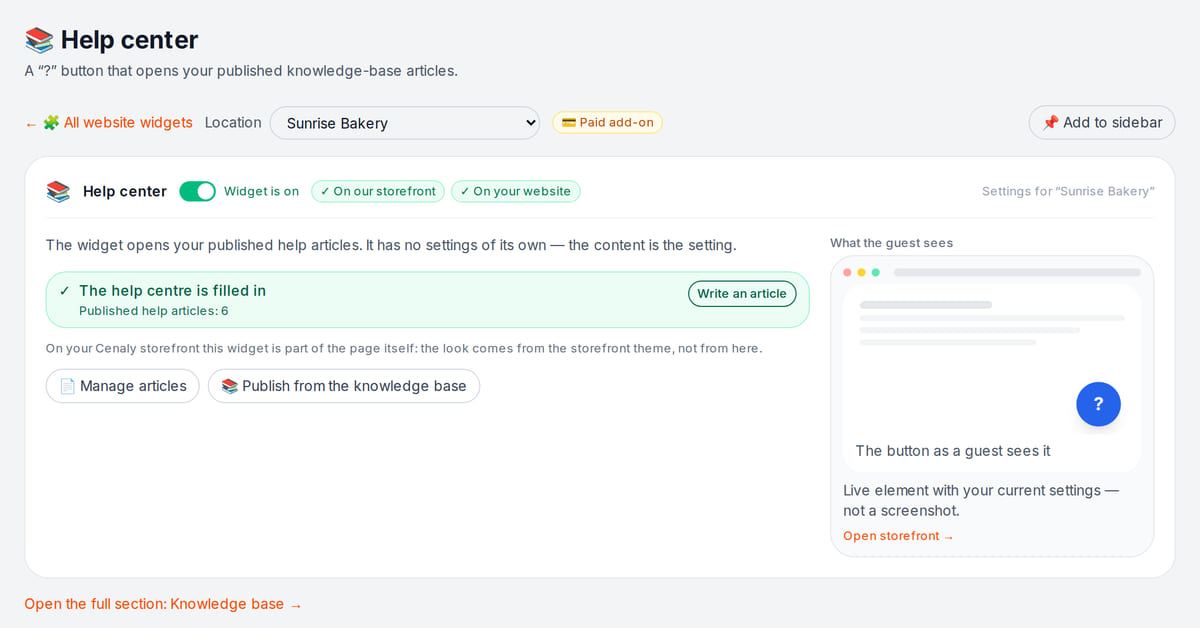
Articles are managed in “Articles & pages”

How it works in practice

Illustration. Delivery and payment answers right next to the order button

How it looks on your site
Example interface. Customise colours, position and labels, then check your page on desktop and mobile.
On desktop
On mobile
Where it goes
Exact menu names and plan requirements, taken from each platform’s own help center.
Sites built with our website builder ship with the widgets already wired — nothing to paste.
Step-by-step guides per platform — in the help center →Pricing
Add-on, price in the catalogue
- The panel uses an add-on subscription; see the price on this page and in your dashboard catalogue
- Paying yearly means 10 months instead of 12
- The number of articles, languages and views is never metered
- Articles and the help centre page on your Cenaly.ru storefront are part of the platform; the add-on pays for the panel on your own site
- There is exactly one billable unit — the add-on subscription: not articles, not views, not visitors and not domains
- AI can help with drafts and translations. AI availability and charges depend on account terms; you review the text and each language version before publication.
With and without
| Without the widget | With the widget | |
|---|---|---|
| Where visitors look | ✕ The same question arrives in chat, by email and by phone | ✓ The answer opens as a panel on the page where the question came up |
| Who updates the text | ✕ The FAQ page is edited by whoever has access to the markup | ✓ Publish guest-facing articles and the language versions you need. After publication is processed they appear on the help page and in the panel; the Help tab in chat requires guest chat to be connected. |
| Languages | ✕ Language versions of the rules have to be assembled and published separately | ✓ Publish the language versions you need; AI can draft them according to account terms |
| Feedback | ✕ You judge your answers by the support queue — what people actually searched for stays unknown | ✓ The report shows article votes and the queries that returned nothing |
| Load on the team | ✕ The team repeats the same rules in circles | ✓ Repeat questions are closed by the visitor before anyone contacts support |
Honest about the limits
- Until you publish articles the panel is empty — the widget does not fill itself.
- Knowledge base → Analytics shows views, search-query text, result counts and article votes. Events from this panel are combined with the storefront help page; there is no report limited to this panel alone.
- Search is limited to your own articles: we deliberately never mix in results from the open web.
- Publish guest-facing articles and the language versions you need. After publication is processed they appear on the help page and in the panel; the Help tab in chat requires guest chat to be connected.
- This is a paid add-on: the price is in the extensions catalogue, and you publish the articles yourself.
- The panel’s own labels cover four languages (English, Russian, Georgian, Turkish); article texts follow your site languages.
- AI can help with drafts and translations. AI availability and charges depend on account terms; you review the text and each language version before publication.
- Reports contain entered search queries, so they are not guaranteed to exclude details a visitor typed into search.
Who it's for
- Shops with delivery, payment and return questions
- Services with booking, cancellation and deposit rules
- Anyone whose support answers the same things every day
What an on-site help centre is and when you need one
A help centre is a panel of published answers on your site. Visitors open articles and search their text; your team controls content and updates.
Useful when your team often answers the same delivery, payment or booking questions. Start with those answers and add articles based on searches with no results.
Publish a selected knowledge-base document as a help article and unpublish it later. First remove internal instructions, personal data and anything not intended for guests: the article becomes public. Knowledge base → Analytics shows views, search-query text, result counts and article votes. Events from this panel are combined with the storefront help page; there is no report limited to this panel alone.
The help centre answers through published text. For personal or urgent questions, connect chat separately and arrange team replies. The Help tab inside chat is another surface for the same articles.
Questions and answers
How much does it cost?
The panel uses an add-on subscription; see the price on this page and in your dashboard catalogue Annual billing costs 10 months rather than 12. Articles and views are not individually metered. AI can help with drafts and translations. AI availability and charges depend on account terms; you review the text and each language version before publication.
Where are articles written and updated?
Publish guest-facing articles and the language versions you need. After publication is processed they appear on the help page and in the panel; the Help tab in chat requires guest chat to be connected.
Can I publish an article from the knowledge base?
Publish a selected knowledge-base document as a help article and unpublish it later. First remove internal instructions, personal data and anything not intended for guests: the article becomes public.
How does search work?
Visitors search your articles: titles, categories, descriptions and body text, with up to 20,000 characters of each article indexed. There is deliberately no web-wide search in the panel — visitors only ever see your own rules.
What if I have no articles yet?
Until you publish articles the panel is empty — the widget does not fill itself. AI can help with drafts and translations. AI availability and charges depend on account terms; you review the text and each language version before publication.
Where do I see what visitors searched for and whether articles helped?
Knowledge base → Analytics shows views, search-query text, result counts and article votes. Events from this panel are combined with the storefront help page; there is no report limited to this panel alone.
How do I install it?
Add the shared tag to an allowed custom-code field, enable the add-on and publish articles. Code access depends on the site platform and plan. Test publication, search and article reading before advertising.
Will the help centre slow my site down?
The article frame is created when the panel first opens. Button code and settings load beforehand; the page load is not zero.Opening loads the help page and its content. Test speed and mobile layout with your article collection.
Can I open the panel from my own button?
Yes, with a `window.CenalyHelp.open()` call from any link or button of yours — a “Help” item in the site menu, for instance.
What do I need to install it?
An account, your website domain and permission to insert code. Prepare the selected widget’s data and test your published page. Follow the separate cookie banner instructions for early tracker blocking.
Will it work on my page?
Style isolation reduces conflicts but does not replace testing. Check buttons, forms, mobile layout and other scripts on your site.
What about languages and data?
Set your own texts separately; built-in labels fall back to English where translations are missing. Core data is stored in the brand’s cloud. Connected AI, telephony and other services have separate processing terms.
More — installation per platform, settings and troubleshooting — in the help center. Installation guide →
Works together with
All 13 widgets →Live chat
Live chat with visitors — answered by your staff from the team chat
Free
Legal pages
Privacy, terms, returns, cookies, delivery — built from your own data and embedded in your site
Add-on, price in the catalogue
Cookie banner
Cookie consent with tracker auto-blocking and Google Consent Mode v2
Free
Let visitors answer their own questions
After signup, publish your first answers, connect the add-on and install the tag. Check an article, search and events arriving in the report.
Set up your help centreArticles and languages never metered · yearly = 10 months instead of 12 · the search report is included